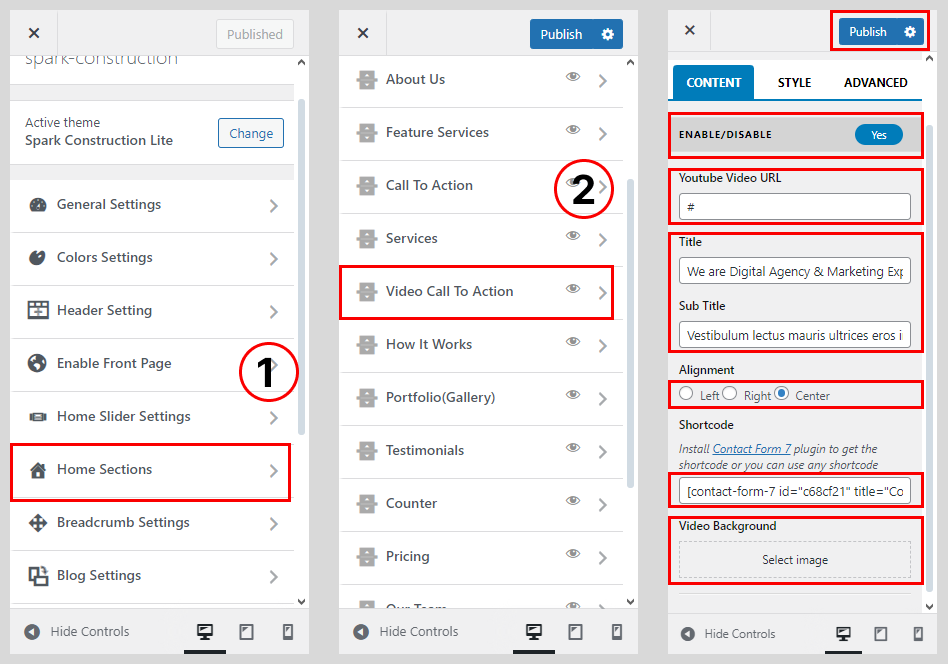
How To Configure Video CTA Section
Create other Video CTA Section in the same way.
- Go to Dashboard > Appearance > Customize.
- Go to Home Sections > Video Call To Action Section
- Set ‘Disable Section’ to ‘No’ if you wish to disable the video call to action section on your home page else set the option to ‘Yes’.
- Write a Youtube Video URL
- Set the video call to action section title under the ‘Title‘ text field
- Set the video call to action section sub-title under the ‘Sup Title‘ textarea field.
- Select the Text Alignment
- Write a Short Code For Contact Form
- Select the Video Background For Image.
- Click on the ‘Save & Publish‘ button.